Editing Menus During Boot
- If the menu is not normally displayed during boot, hold down the SHIFT key as the computer attempts to boot to display the GRUB 2 menu.
With the menu displayed, press any key (except ENTER) to halt the countdown timer and select the desired entry with the up/down arrow keys.
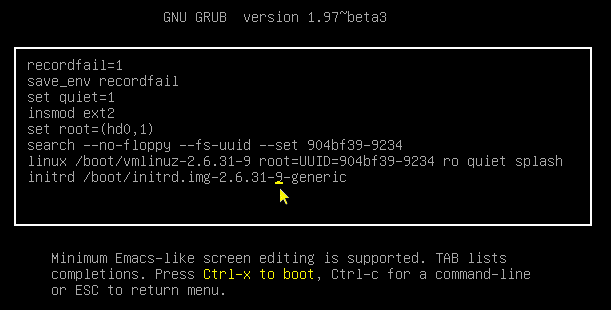
- Press the 'e' key to reveal the selection's settings.
Use the keyboard to position the cursor. In this example, the cursor has been moved so the user can change or delete the numeral 9.
Make a single or numerous changes to any or every line. Do not use ENTER to move between lines.
Tab completion is available, which is especially useful in entering kernel and initrd entries.
- When complete, determine the next step:
- CTRL-x - boot with the changed settings (highlighted for emphasis).
- c - go to the command line to perform diagnostics, load modules, change settings, etc.
- ESC - Discard all changes and return to the main menu.
- The choices are listed at the bottom of the screen as a reminder.

No comments:
Post a Comment